Superb online and offline backup tool
If you've never performed a backup of your Mac, then you're risking potential disaster if your hard drive fails or the 'On' switch simply doesn't work for some reason.
Top Recommended Alternative

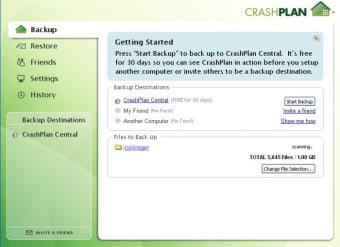
If you've been put off by backup tools because you're intimidated by how complicated they might be, then you may be pleasantly surprised by CrashPlan. CrashPlan offers you two options - online and offline backups. Online backups are obviously not free but they are automatic and ensure that you'll never have to worry about losing data again. Offline backups are free and quick although you should make sure the hardware you're backing-up to is secure. You can backup up to 10 different machines and you can even backup your data to other Macs or PCs.
Getting started with CrashPlan couldn't be easier. The installation wizard requires four simple steps to setup a CrashPlan account including your email address, username and configuring a password. Then all you have to do is choose a method for backing up. If you choose to backup online, anything more than 2 GB could take a long, long time, so be prepared to wait. However, if you choose to backup to an external drive, then in my case, 60GB gave me an estimated time of five hours, which isn't bad.
Every step of the way, CrashPlan explains clearly what is happening and what will happen next. It consumes very little of your CPU as it backs up, leaving you to get on with more important things. The only complaint I'd make about CrashPlan is that it should have detected that my external hard drive was not big enough to backup my hard drive. It simply goes straight into the backup and only informed me that the disk is full only when it reached that stage.
CrashPlan is an excellent piece of backup software. Easy to use, fast and lightweight, it ensures that either online or offline, you'll never have to worry about losing your data again.
Changes
CrashPlan is smarter about backing up, using less bandwidth and disk space. In other words, backups complete faster! Here's what changed: Data de-duplication is even more efficient at finding data matches in your files, which means less data to back up! CrashPlan's default backup file selection has been improved on Windows and Mac. The Windows installer is now code signed. This means no security warnings on Windows installations. The Mac Uninstaller no longer runs in terminal. Now when you uninstall CrashPlan, the Uninstaller runs in an application window. Much better! Bug Fixes Some users, under certain conditions may have noticed issues that prevented CrashPlan from performing as expected. Thanks to our loyal customers who reported these problems.